-1.png?width=200&height=31&name=5d5935a71e139881261fcfbc_20190812_ConnectAd_Minimal_color%20(3)-1.png)
All domain-related information is available directly in the "Domains" section of our dashboard.
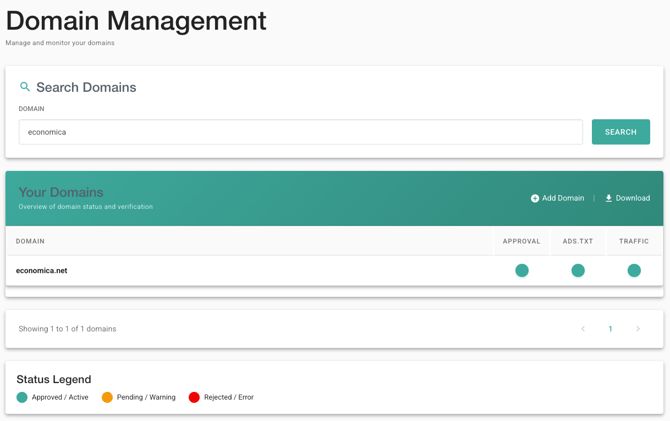
|
Column |
Cescription |
|---|---|
|
Approval |
Shows if the website has been approved (see "Domain Approval") |
|
Ads.txt |
Are all required ads.txt records up to date? |
|
Traffic |
Indication if we have received traffic within the last 7 days |
The different colour codes have the following meaning:
|
Color |
Description |
|---|---|
|
Green |
Approved / Active |
|
Orange |
Pending / Warning |
|
Red |
Rejected / Error |
You can find an overall single status indicator in the "Inventory Management" section for both "Sites" and "Tags".

⚠️ Important: All domains that send traffic to our system are automatically listed in the "Domains" section.
⚠️ Important: The "Add domains" feature is primarily intended for pre-approving domains and does not replace creating sites in the "Inventory Management" section. If you only add a domain here but do not create the corresponding site under "Inventory Management," you won't be able to get the corresponding header-bidding ids.